
Double Your Productivity: Absorb Information Twice as Fast
 I’ve been noticing a trend lately: We buy or download all this great video content, but then we don’t actually watch it. Does this happen to you, too?
Most information products these days come with at least an hour of video training. And often, it’s fantastic–well worth the time investment. But, realistically, we’ll probably never sit down and actually watch it.
I’ve found a way to fix this–a technique so effective that I’ve now made my way through most video information products I’ve purchased in record time while still absorbing all the information. And, I want to share this with you–because if you can absorb video content faster, you can learn faster, and therefore spend more time on your business instead of watching videos!
This video shows you how to download videos to your hard drive, then watch them at double speed or more. You can accomplish this with three software tools that are all free and platform-independent. In other words, this works equally well for Mac, PC, and even Linux!
How to Double Your Productivity and Gain More Value from the Products You Buy (4-Minute Video)
[0:33] You need three essential tools to watch videos twice as fast. Here they are, along with download links:
Download the Firefox web browser.
Download Video Download Helper.
Download the VLC video player.
[1:27] Here’s how to download videos from pretty much any website.
[2:33] Hit Play on the video, then click the Video Download Helper icon to download the video.
[3:04] How to play a video in VLC.
[3:13] How to speed up any video in VLC.
[3:46] I usually run videos at 1.4x-1.9x, depending on how fast the speaker is talking.
[4:02] Bonus tip: Use this technique to load videos on your laptop and watch them on a plane with VLC. I do this all the time…I can typically roll through most of an info product in one flight.
How to Download TED Talks
Want to watch all those great TED talks without having to be online? You can download and speed them up, too.
Video Download Helper doesn’t work with TED talks, but that’s okay. TED talks include a “Download” button (see below image.)
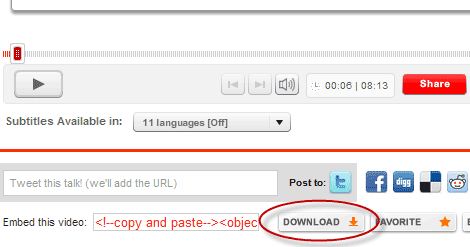
Download TED talks from ted.com and then speed them up.
Click that button, then click “Download video to desktop (MP4)”. Then save the file and open it in VLC, and use the same speed-up trick I showed above.
Download and Speed Up Any Audio File
I use this same trick with audio files (interviews and podcasts) all the time. I use Winamp plus the Chronotron plugin to speed up audios while keeping the pitch the same. I typically run audios at 1.4x-1.6x.
Steve Pavlina also has an article on how to speed up any audio file.
Speed Up Any CD or DVD
If you have a CD or DVD that you’ve received as part of an information product, you can simply rip it to a .mp3 (audio) or .mp4 (video) using any one of several tools. (Handbrake is the most common one; it works on any platform.) Then use VLC to play it, just like above.
Recommended Reading:
- Overwhelmed by “Getting Things Done”? Try This Instead… “Getting Things Done” doesn’t have to be painful. I showcase my simple productivity system in this video.
- They’re All Going to Laugh At You. Let’s face it. When you start a business, you’ll probably fail…