
Overwhelmed by “Getting Things Done”? Try This Instead…

overwhelmed by getting things done If you feel like you’re not getting enough done in your business, but complex systems like “Getting Things Done” feel like too much of a production, I completely understand. Here’s my simple to-do system–an alternative to “Getting Things Done”–that I have been using for years. Try it yourself and you just may notice a sea change in your productivity.

I don’t use a costly system. In fact, my initial investment was about $6: Several notebooks at Big Lots–a closeout store. (Here are the same notebooks on Amazon.)

Below are some questions and answers showing exactly how I use this system. If you have additional questions after reading this, please feel free to post them in the comments.

Q: Why/how did you decide to use this system?

I want to do something productive to move my business forward every day. Running a business is a marathon, not a sprint. Doing 1-2 hours of productive, creative work every day will do amazing things to help your business grow. By keeping my task list simple and filled with tasks that are both creative and productive, I know I’m moving in the right direction. And there’s nothing like flipping through pages of crossed-off to-do items to make me feel like I’ve really accomplished something.

This to-do system may sound deceptively simple, but the reality is that having my notebook open and beside me at all times motivates me like nothing else. I can immediately look at it and pick one task and just start working. Without it, I would be lost–and I would probably resort to surfing the Internet a lot!

Q: How do you decide which tasks to put on your list?

At the beginning of the notebook, I leave space for big projects. (I typically organize these by month.)

Every Sunday night, I write a to-do list for the following week. Next to each item, I write an approximation of how many minutes it will take for each task.

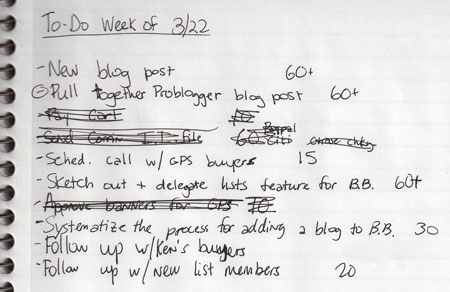
Each week, I aim for 5 “big” tasks and 5-10 smaller tasks. I classify all tasks by the time I think they will take–in minutes. (This also forces me to get far better at estimating how much time each task will take.) You can see the time estimates in the picture below; “60+” means more than 60 minutes, or multiple hours. If I believe a task will take more than 2-3 hours, I will break it down into smaller tasks (e.g. “write blog post 60,” “edit and post blog post 45.”)
getting things done
This week’s task list.

Q: Do you modify your list during the week?

The list isn’t sacred. I can–and do–modify it during the week. If an email comes in with a task that takes longer than 10 minutes, I write it down on the list. If it takes less than 10 minutes, I do it as it comes in.

Q: What do the circles around some of the dashes before the tasks, like “Pull together Problogger blog post,” mean?

This is how I denote “A task so large that I don’t need to do anything else that day.” If I clear that task in one day, I take the rest of the day off. That’s how I motivate myself to tackle bigger projects.

Q: You’re a geek. I’m surprised to see you using a notebook. Why not use a software-based task system?

One of the reasons I use a notebook and not a computer-based task system is that it was too easy in most systems to move tasks from one week to the next. With every computer-based system I tried, I ended up with a pile of stale tasks at the bottom of my list that grew larger over time. That was incredibly demotivating.

With my notebook, I start fresh every week. When I do my Sunday night writing-down of tasks, I manually copy tasks from last week to this week. I use that time to consider why tasks didn’t get done. Sometimes I simply run out of time or energy to get everything completed. But other times I realize that there is a draining task I really don’t want to do on the list. If a task remains on the list for more than two weeks, I generally either outsource it or forget it. This notebook, then, is a perfect way to see what I need to outsource next in my life–as well as what’s not important to me.

I don’t write 100 tasks on my to-do list. Bigger projects go at the beginning of my notebook or in a mind map.

If I get everything on the list done for the week, I take the rest of the week off. This is rare, but it does happen…and I make sure to never pile more things on my list just because I am done with my tasks for the week. I reward myself with a day or two off instead.

Q: Why do your task list on Sunday night and not Monday morning?

In Jack Canfield’s book The Success Principles (which I highly recommend reading), he suggests adding tasks and looking over your to-do list before you go to bed so your subconscious can figure out the most effective way to do your tasks while you sleep.

I find I also sleep dramatically better with my to-do list out of my head…I don’t get awakened with any thumping heart, “oh my gosh I need to…!” moments. If my mind insists on going over a task I have on the list, I remind it that I already have that task written down, and my brain quiets so I can go to sleep.

I have been known to get out of bed and write tasks down in my notebook so I don’t forget them. (Same with blog post ideas!) It’s worth the two minutes of getting out of bed so you can sleep better at night.

Q: Do you recommend this system to everyone?

Everyone is different. This is the system that works for me. I happen to know that this system, or a similar one, also works for many others. (I sent J.D. Roth over at Get Rich Slowly a link to this video, and he loved it so much that he started using a similar system!)

You may or may not like this system; that’s fine. What’s important is that you have a system. Never turn on your computer without knowing what you want to accomplish; there are so many time-sucking programs and websites that you can spend hours on without ever really doing anything. Having a system helps to ensure that when you do decide to work, you get the most important things done.

Have questions? Want to share your own system? Feel free to leave a comment!

Recommended Reading:

Like this entry? You will love getting my free business tips! No spam, and I won't give your email address to any other company.

Post to Twitter Tweet This Post to Delicious Delicious Post to Digg Digg This Post to Facebook Facebook Post to StumbleUpon Stumble This

Email This Post Email This Post   | Print This Post Print This Post


Previous post in this category:

Posted on Thursday, March 25th, 2010

53 Responses to “Overwhelmed by “Getting Things Done”? Try This Instead…”

  1. Jen Says:

    Hi Erica
    I use a similar method and find it works really well. There is something about physically ticking things off that is really satisfying too!
    Jen

    Reply

  2. Dave Doolin Says:

    Very nice. I like the little trailer at the end.

    I’m using B5 paper for scheduling calendar type things over a month. I write tasks/events/articles out by day or week or whatever, then I can arrange them on a table (or floor) to get a better view of what’s going on. Computerized tools just don’t the same “hand” (for lack of a better word). Then I transfer the schedule into tasking and pitch these papers.

    Stuff long term moves from B5 to a Trac tasking system where everything is milestoned. If I mothball a project, everything that got done is recorded, everything needing done is saved. But these tasks usually start on paper.

    Notebooks. 15 years of them. I never look at them! So I stopping using them. :(

    Anyways, great video, great energy, very nice to see someone else using what works best, even it’s “old school.”

    Reply

  3. Codrut Turcanu Says:

    Now, these are the type of practical tips I hope to read on your blog more often – and the video gives the human touch :)

    I use a similar system myself and can attest it works, if you make it work!

    Reply

  4. Mike Says:

    Love this Erica. I use a simlar system. I think mine would be the GUYS version of yours. I use one of those small flip up memo pads, I call it my Low Tech PDA. EAch day normally just one page in it, and the next day I start a new page. Or I use one page per TOPIC if I have major things going on. It’s small and I can fit in in my sport coat pocket or my back jeans pocket. Plus if I end up at a impromtu meeting I can just pull it out and take a quick note. Then people think, “Oh he is really listening”. Or they sometimes think I am “Columbo” and investigating a crime scene. :) It works like a charm. I even used this method for dieting. Each day I noted on page exactly how much i weighed, what I ate, and what exercises I did.

    Reply

    • Erica Douglass Says:

      A food journal is another good use for a notebook. I did this for a while too–when my nutritionist and I were trying to figure out what was wrong with my health.

  5. Ivan Walsh Says:

    Show off!

    Mine is here: http://www.flickr.com/photos/ivanwalsh/4450159189/

    I always find writing faster v using OneNote or whatever.

    One thing: I break tasks into 45 min blocks, then stop one the hour.
    AND re-check after lunch as things happen during the morning!
    Keep it simple, always works.

    Ivan

    Reply

  6. chris mahan Says:

    Oh yeah. I do something very similar. I’m a programmer, and I have used all kinds of online tools (even bugzilla once–worked well for complicated project) and I always come back to the paper.

    I like to list everything on one piece of paper. I write small. I can easily jot 150 items. When one gets done, I mark over it so thoroughly that there is only a black blob left; it’s impossible to read what was written there. If a followup is needed, I write it down.

    I don’t put time estimates, because that entails extra thinking and doesn’t get me closer to completion.

    When the page is full, I get a new one and copy everything. Older items gravitate to the top, so I think about them first: Do I need to drop it, keep is as-is, or split it? When you write the same thing each time you make a new sheet, it forces you to make that decision.

    There is only so much we can keep in our brain at the same time, so writing it down frees up that part of the brain. My system also encourages me to just stop thinking about something I completed. The act of blotting it out on paper says to my brain: dump that now.

    In 1996, I was showing an older Canadian gentleman how to use the internet, email, and enter his stocks in yahoo finance. He said he could not enter his stocks in Yahoo finance. I asked him why. He turned and pointed to about 35 pages sitting on a fax machine. He said his broker sent this to him every day. He then looked at me in the eye and said: “Young man, I have built a five billion dollar magazine business.” He let that sink in then smiled. “The key to success is writing everything down.”

    I’m not about to forget that.

    Another thing my system allows for is that for the ADD/ADHD crowd, out-of-sight really does mean out-of-mind. If you keep all your to-do items in multiple places, it’s incredibly easy for them to disappear into the Void. With my technique, everything is on that one piece of paper that is permanently face up right next to the keyboard, the mouse, and the mug.

    When I find myself drifting into WTF mental land, I just have to lower my gaze to the right and down and I have all my tasks right there. I scan down the list and just hit the first thing that interests me.

    The added advantage is that a $4.50 ream of 500 pages can easily last one year. It’s low-cost.

    The Toyota Production System does something similar with their A3 system. It’s the concept that everything important about a task or a project can be expressed on a single 11×17 (A3 for non-US) sheet of paper. The philosophy essentially says: you must distill the important stuff, present it clearly and succinctly, thus allowing the viewer to gain full understanding at a glance.

    It’s very hard to do well, but when done well, is very effective. (So they say.)

    That’s what I strive for: clarity and ease of understanding. One one page.

    Reply

    • Tommy Stern Says:

      Can’t dismiss the fact that he built a 5 billion dollar business. There is always a better way and for him he doesn’t need better. Everyone has their own strength and weaknesses and need to know what they are so therefore apply what works for them.

      Great letter.

      Thank you,

      Tommy Stern
      CEO, DoTheRighThingAmerica.com

    • Erica Douglass Says:

      “Another thing my system allows for is that for the ADD/ADHD crowd, out-of-sight really does mean out-of-mind. If you keep all your to-do items in multiple places, it’s incredibly easy for them to disappear into the Void. With my technique, everything is on that one piece of paper that is permanently face up right next to the keyboard, the mouse, and the mug.”

      Yep, exactly!!

  7. Maren Kate Says:

    i’ve used Getting Things Done (The book’s) guidelines for a while and though they work they can be utterly exhausting to keep up with… this was enlightening so i am excited to try out your system over the next week and see how it works.

    Reply

  8. Tyler WebCPA Says:

    Do you have a time budget before you write down you list and decide what can reasonably be accomplished in the week that you have? I know my list is much longer than the time I could realistically spend on it and so many tasks get pushed into the indefinite future.

    Reply

    • Erica Douglass Says:

      5 big tasks and 5-10 smaller tasks per week. A ‘big’ task is 60+ minutes (typically 2-3 hours.) Smaller tasks are anything from 10-45 minutes.

      -Erica

  9. Deb Lamb Says:

    Hi Erica,
    I have been using this method for years! Even when I was in the corporate arena, I always had a spiral notebook right beside me. It was great for looking up old phone numbers, specific dates or names. I could always go back and find my notes of where I had written it down.

    I label mine on the outside as well and put an ending date when I have used up the spiral completely. They have been an excellent resource many times over and have saved me in a few instances by having “documentation” on a specific day.

    I could not function without my spiral notebook. Sometimes Walmart will run a “back-to-school special” and have them for only .10 cents each. I really stock up then.

    So glad to see other people using this same idea. It works very well for me and I will continue to always use it.

    Make it a great day!

    Deb :)

    Reply

    • Erica Douglass Says:

      “I label mine on the outside as well and put an ending date when I have used up the spiral completely.”

      Me, too. Not shown in the video, I suppose!

  10. Anand Says:

    Hey Erica,

    I’ve been using notebooks to organize my to do lists for years! I’ve tried numerous software solutions (programs like Ascend, Outlook, even Google’s task app) without much success. It’s way more efficient to have a simple system to get things done.

    I like the way you setup your notebook. Mine starts out that way, but then becomes a very long list of 100 plus things to get done. Keeping it to 3-4 main tasks per day is definitely the way to go.

    Thanks for the tip!

    Reply

  11. Andy Dolph Says:

    Hi Erica,

    Thank you for sharing a system that is so simple and elegant. I read Getting Things Done and it was way to hard for me… I also did a course in Total Relaxed Organization which is a derivative of GTD. I did it for a while – but still to hard.

    This seems much easier.

    Thanks!!

    Andy

    Reply

  12. Kimberly Blessing Says:

    Yes, yes, yes, Erica! Paper is the way to go. Like others, I’ve tried the programs. I’ve even tried various pre-printed task list paper. But when it comes down to it, just some plain old ruled paper works best.

    I like to recopy my list every day, as I find it works as both a good reminder (I don’t carry my list everywhere I go, it stays at home on my desk) as well as a good motivator (“Wait, I’m copying everything from yesterday plus new stuff for today? What did I do yesterday?”).

    The one thing I’m going to try, after reading your post, is adding the time estimates to each task. Generally I write my list in three buckets: the top priority items sorted by LOE, the medium priority items sorted by LOE, and the simple “filler” tasks (things I can do even if I’m brain-dead, so that I don’t waste time).

    Thanks for the great post!

    Reply

  13. David Risley Says:

    I’ve been doing something similar to this, however I’m still trying to be paperless about it. These days, I’m using RememberTheMilk.com. And I take notes in Evernote. But, there is always something cool about the good ol’ pen and paper. :-)

    Reply

  14. Antti Kokkonen Says:

    I think everyone should find *their* way to do things. There is no “right way” to do things. One likes digital tools, one likes index cards and one likes notebook. Personally, I do a mishmash Google docs with Remember the Milk + GMail and bake the result for a couple of minutes and serve it with paper & pen.

    With that said, I think the key to any “system”, GTD or not, is focusing on things that really matter and ignoring A LOT – all the important things get done and you are not to wasting any time on things you don’t need to do.

    Reply

  15. Dustin | Engaged Marriage Says:

    Thanks for the great, practical tips here Erica! I used to do everything on paper (way too many post-it notes actually) but then tried to convert to an online system. Frankly, I think I’ve regressed with this move, and your post has inspired me to go pick up some notebooks and try your system. Great stuff!

    Reply

  16. Paul Hobart Says:

    Hey Erica,
    Great to see your smiling face on the video. Love the system. Like many of the early commenters, I have tried GTD and Franklin Planner, and like parts of all of them. What I find is that using a simple legal pad and writing seems to “involve” me more in the tasks. I just transferred some incomplete items to today’s page, and by writing things down, I think it triggers my brain to start doing some work on it’s own.

    Sounds weird, but that’s how I feel about it.

    Think I need to go with the notebooks…the pen holder is such a nice feature.

    Hope to see you soon

    Paul

    Reply

  17. Logan | Legendary Strength Says:

    Its great to see what another person uses. I have a system that works great for me using Planner Pads. And I always plan my week out on Sunday night too. There’s a few takeaways here that I can incorporate. Thanks!

    Reply

  18. Brent Says:

    Nothing beats the good old pen, paper and notebook.

    Reply

  19. Allan @ Rich Money Habits Says:

    I agree that if something gets put off consistently, you definitely need to step back and ask why. Sometimes those things that you put off are the really important ones…and the only reason you’re finding excuses not do them is because of fear.

    Reply

  20. Justin Matthews Says:

    There is something about having it written out that you cant duplicate on the computer. I use a couple of 6X8 notepads for list ideas and an
    8 1/2X11 sheet of cardstock to graph out all of my writing projects under fiction, nonfiction, guest posts, blog posts etc. That is the only thing I have found that doesn’t get shut down or overwhelmed with other windows on the computer.
    Great tips with the time estimates and there is something great about crossing that list off…

    Reply

  21. Eric Doggett Says:

    I’ve been using Daylite on the Mac and have been loving it. But I definitely see the benefit in mapping out a week’s tasks ahead of time, and it’s something I’ll be doing more of!

    Reply

  22. Rudy Says:

    The only thing that I really kept from Getting Things Done was the “If it takes less than 2 minutes, do it now” idea. Besides that, it seemed like too much of a chore. Instead, I have my whiteboard and MS OneNote. I swear by OneNote and wonder why Microsoft doesn’t push it more! I guess because OneNote is a little weird to explain to newbies.

    Reply

  23. VAL Says:

    Erica,

    This post left me with a BIG smile!

    Right out of college, I worked for an Ad Agency and my boss taught me to always carry a spiral notebook to write down notes from conversations (General notes, Phone calls, meetings, action items) – she practiced this herself, so I followed the same.

    Over the past few years, and now within my own business, I have amassed quite a collection of notebooks (I have saved them all in boxes for what I believe will be used for future reference/entertainment).

    Incidentally, I tried to go digital and modern this past year (Save the Trees), by using my laptop. Not only was it pain to literally ‘schlep’ my laptop around everywhere, I constantly had to worry about charging the battery, or find an electrical outlet – this idea became impractical on a number of levels.

    I have discovered that sometimes it’s nice to get out of the home office and just sit under a tree or at the beach to write thoughts without having to worry about battery life, electrical outlets, safety, broadband connections, screen glare, or locating files on my hard drive among other things – I have very happily since returned to writing things down in a spiral notebook. :)

    Reply

  24. Piper Says:

    I just started using notebooks about 6 months ago – and love this system too! It’s the most effective I’ve found.

    Reply

  25. Tommy Stern Says:

    Each person needs to see what works best for them. It seems the actual task of writing also writes it in the writers brain.

    The main point which is which works best to get the task done? The more dicplined you are the more you could use digital help. The less displined you are the actual task will bring you closer to action. If it does not bring you to action, like someone else mentioned, there is a block. That block is usually fear or a lack of clarity.

    Tommy Stern
    CEO, DoTheRightThingAmerica.com

    Reply

  26. carrie Says:

    Hi Erica, I like your thinking but I I recently discovered Evernote and I do like it as a way of using or integrating lists. It enables you to have a searchable database, so say you have a project you finished but want to go back to your notes in a few months for a new similar project, you’ll have it electronically. I think this is a bit better then the spiral notebook, but I also use pad and paper for certain projects too.

    Reply

    • Erica Douglass Says:

      Yeah, David Risley (above) mentioned Evernote too. I use it on my cell phone. HUGE negative for Evernote: You must be connected to the Internet; there’s no offline sync (at least on the cell phone client.) That’s too much for me to rely on. So I use it for less important stuff, but my to-do list goes in a low-tech offline notebook.

  27. Susan Says:

    When are we getting an update on your new web 2.0 projects?

    Reply

  28. elena Says:

    Hi Erica. Thanks for amazing video.I am struggling to organize myself.
    I’ll give your system a go,because I like it.

    Reply

  29. Pat Chiappa Says:

    There is NOTHING like a good ol’ Mead spiral bound notebook and a great pen. I love the combo of using Mindmeister and Mead (sounds like a law firm…)

    I recently finished a 10,000 word e-book – you’re right – it’s a huge task, I sure could have used this tool sooner. Now I’m ready for the next one!

    Thanks for sharing -

    Reply

  30. Ken Siew Says:

    Hey Erica, I’ve been using a similar system to get things done, although less comprehensive than yours. I tried reading GTD, but I just couldn’t seem to get through the book (it’s one of those books that you can’t seem to finish). There were a lot of high-level concepts that I thought were useful, but it’s really not my thing. I’d much rather use a simple system like yours to do stuffs.

    Likewise, I write down my tasks on a notepad, and cross out the tasks when I complete them. I don’t usually put the estimated time next to it (I probably should). I’ve recently started using e.ggtimer and it worked surprisingly well for me, but I just need to get in the habit of using it :-)

    Along the same line, if you love your biz, most of the stuffs on your list should be the stuffs that you love! Otherwise, you might not be in the right biz, at least that’s what I believe in.

    I’m glad that there’s someone out there who’s using a simple system to accomplish big stuffs! It makes me think that there are really no rules in this world…Thanks Erica!

    Reply

  31. Merlin Says:

    Hi,
    there’s a couple of things I didn’t quite pick up in your video, I wonder if you could clarify?:

    * You say you have the whole weeks’ tasks at the bottom of the page; does that mean you copy all the tasks from page to page every day? Do you copy them all at the beginning of the week, or do you do it at the beginning [or the end] of each day? If so, isn’t the endless repetition and copying soul-destroying?

    [I'm thinking you'd *have* to have all your tasks pre-copied, or else the first time someone asks you to do something this Thursday, you'd need them there so you could look at your page and say, "yes that's ok" or, "no I'm too busy, let's make it another day"...]

    * You say you make notes re phone numbers, things to remember etc in the same notebook – how do you search for them later? If you want to know Joe Bloggs’ phone number right now, do you have to try to remember which day you last wrote something about him in your book, or what project it was related to? I could see endless flipping of pages trying to find the one bit of info you’re after. And what if it was in your last book, or the one before that?

    Thanks in advance for your comments…

    Reply

    • Erica Douglass Says:

      Hi Merlin,

      I’ve changed things a bit since I did that video. Now I only write tasks weekly, and look at the weekly list when deciding what to do for that day. Occasionally I will write a daily list if I have a day where I need to be super-organized (i.e. packing for a trip.)

      Regarding phone numbers and things to remember, I just flip through it. There aren’t that many pages to go through, as one notebook usually lasts 6-8 months or so.

      -Erica

  32. James Robertson Says:

    I’m torn, I’ve tried using your note book method for awhile. I found it very useful & simple. However, I don’t really like the idea of carrying a notebook around all the time. After a couple of months of trying your method I read “GTD” and then switch to a version of David Allen’s system. I totally agree with your posts in regards to the GTD system, it’s a lot to manage. I like the idea of an “inbox” but I feel like I’m constantly managing it.

    I’m lost and torn at what to do next. Even though you address the pitfalls with “going digital” I really like the idea of using a program like evernote to sync my multiple computes & phone. This way I will always have a version of my lists together. There is something to be said about actually writing your task down though. I’ve been trying to think of someway to create a hybrid system combining some of your techniques with that of David Allen’s.

    What are your thoughts??

    Thanks
    James

    Reply

  33. Constantin Gonzalez Says:

    Hi Erica,

    thanks for your neat productivity video! Who would have thought someone could come up with something even more simple than “Getting Things Done”?

    I just finished a blog post about how to clean up your Email INBOX to zero emails, and how filing emails away can be as simple as a single keystroke. Your video is the perfect complement, because part of my system involves converting emails into todo items which you just made much easier to deal with!

    Here’s the post, I was very happy to link to your video at the end of it: http://constantin.glez.de/blog/2010/04/spring-cleaning-part-1-how-tidy-your-email-inbox-and-file-email-away-one-keystroke

    Thanks for your simpler-as-GTD-post and all the other cool tips on your site!

    Cheers,
    Constantin

    Reply

  34. Rose Says:

    Thanks again for your thoughts!
    I also found I need to write my lists down on paper. I use a modified version and write in a hard bound journal – I travel via backpack a great deal, and I need something sturdy. Side note: I like attractive journals. Somehow it’s more pleasurable to find an old manuscript (faux) embossed journal sitting next to my computer when it contains To-Do items I detest.
    In it I include my To-Do, as well as a blurb of each day’s activities and accomplishments.

    Cheers, and thank you for the workshop tonight!!!
    - Miss Rose

    Reply

  35. Chris Peterson Says:

    Thanks for niche article. Your video is too much interesting.

    Reply

  36. CC Says:

    Erica,

    I found your post on you tube and found your bubbly talk very motivating! Thank you so much. I used to be very organized and write down my lists in college dutifully every night. Then I started working office jobs and veered into the “let things happen” mentality for several years. Well, a milestone birthday hit me hard, so I’m trying to turn things around with God’s help and a simple notebook seems like the place to start. Thank you for these great tips/suggestions. I know you mentioned personal stuff was at the bottom of the page and I was just wondering if you write your grocery and errand lists in the same notebook?

    Thanks so much, CC in VA!

    Reply

  37. Rohi Says:

    Hi Erika,

    Thanks, great post!

    btw, how do you deal with daily recurring tasks like exercise, email, etc.?

    Rohi

    Reply

  38. Mrs. Accountability Says:

    I use the 70 sheet version of these but I stock up at “Back to School” sales at Walmart or Kmart or Target when they are 15 cents or less. They are on sale right now and bought another ten. My husband uses them to track his daily mileage. He drives a lot, so there is a lot of business mileage to deduct and I want solid proof that he does drive all those miles. It is like a diary for him to look back at, especially if we have conflict from a customer on the hours he spent on a job. Cute video. :-)

    Reply


Leave a Reply